MAGE - Without TIEGCM (GR) Quick Start
These instructions illustrate the process of running a geospace simulation using the MAGE model without coupling with TIEGCM. We call this version of the model “GR” (“GAMERA-RAIJU”) for brevity.
Before you begin
Source (not run) the environment setup scripts for the kaiju software. For example:
source /path/to/your/kaiju/scripts/setupEnvironment.sh
Running a geospace simulation with MAGE
The MAGE software needs several files in order to run. The detailed steps
for creating these files have been combined into a script called
makeitso.py. The script is provided in the kaiju code repository. More
information on makeitso.py is available
here.
You can see the options supported by makeitso.py by running it with the
--help or -h command-line option.
makeitso.py --help
usage: makeitso.py [-h] [--clobber] [--debug] [--mode MODE] [--options_path OPTIONS_PATH] [--verbose]

Interactive script to prepare a MAGE geospace model run.

optional arguments:
  -h, --help            show this help message and exit
  --clobber             Overwrite existing options file (default: False).
  --debug, -d           Print debugging output (default: False).
  --mode MODE           User mode (BASIC|INTERMEDIATE|EXPERT) (default: BASIC).
  --options_path OPTIONS_PATH, -o OPTIONS_PATH
                        Path to JSON file of options (default: None)
  --verbose, -v         Print verbose output (default: False).
For this example, we will run the code on derecho, and use the default
BASIC mode, which requires the minimum amount of input from the user. At
each prompt, you can either type in a value, or hit the Return key to
accept the default value (shown in square brackets at the end of the prompt).
To get started, load the CDF library (needed for fetching solar wind data) and
run makeitso.py with no arguments:
source /path/to/your/cdf/bin/definitions.B
$KAIJUHOME/scripts/makeitso/makeitso.py
Name to use for PBS job(s) [geospace]:
Do you have an existing boundary condition file to use? (Y|y|N|n) [N]:
Start date for simulation (yyyy-mm-ddThh:mm:ss) [2001-06-01T23:00:00]:
Stop date for simulation (yyyy-mm-ddThh:mm:ss) [2001-06-02T01:00:00]:
Do you want to split your job into multiple segments? (Y|y|N|n) [N]:
GAMERA grid type (D|Q|O|H) [Q]:
Name of HPC system (derecho|aitken) [aitken]: derecho
PBS account name [<YOUR_ACCOUNT_HERE>]:
Run directory [.]:
Path to kaiju installation [<YOUR_KAIJUHOME_HERE>]:
Path to kaiju build directory [<YOUR_BUILD_DIRECTORY_HERE>]:
PBS queue name (develop|main|preempt) [main]:
Job priority (regular|economy) [economy]:
WARNING: You are responsible for ensuring that the wall time is sufficient to run a segment of your simulation!
Requested wall time for each PBS job segment (HH:MM:SS) [01:00:00]: 12:00:00
(GAMERA) Relative path to HDF5 file containing solar wind boundary conditions [bcwind.h5]:
(VOLTRON) File output cadence in simulated seconds [60.0]:
After these inputs, the script fetches data from CDAWeb for the specified time range to use in the solar wind boundary condition file, and generates XML and PBS files for the run, as well as a grid file for use in the model.
You should see output similar to this:
Generating Quad LFM-style grid ...

Output: lfmQ.h5
Size: (96,96,128)
Inner Radius: 2.000000
Sunward Outer Radius: 30.000000
Tail Outer Radius: 322.511578
Low-lat BC: 45.000000
Ring params:
<ring gid="lfm" doRing="T" Nr="8" Nc1="8" Nc2="16" Nc3="32" Nc4="32" Nc5="64" Nc6="64" Nc7="64" Nc8="64"/>

Writing to lfmQ.h5
/glade/u/home/ewinter/miniconda3/envs/kaiju-3.12/lib/python3.12/site-packages/spacepy/time.py:2367: UserWarning: Leapseconds may be out of date. Use spacepy.toolbox.update(leapsecs=True)
warnings.warn('Leapseconds may be out of date.'
Retrieving f10.7 data from CDAWeb
Retrieving solar wind data from CDAWeb
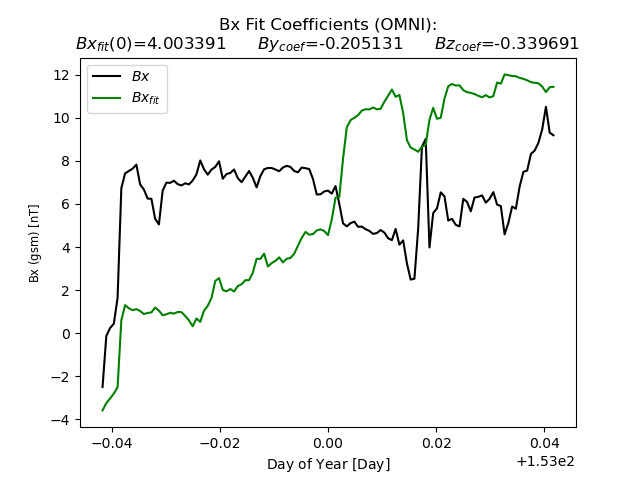
        Using Bx fields
Bx Fit Coefficients are  [4.00339086 -0.20513105 -0.33969058]
Saving "OMNI_HRO_1MIN.txt_bxFit.png"
Converting to Gamera solar wind file
        Found 21 variables and 120 lines
        Offsetting from LFM start ( 0.00 min) to Gamera start ( 0.00 min)
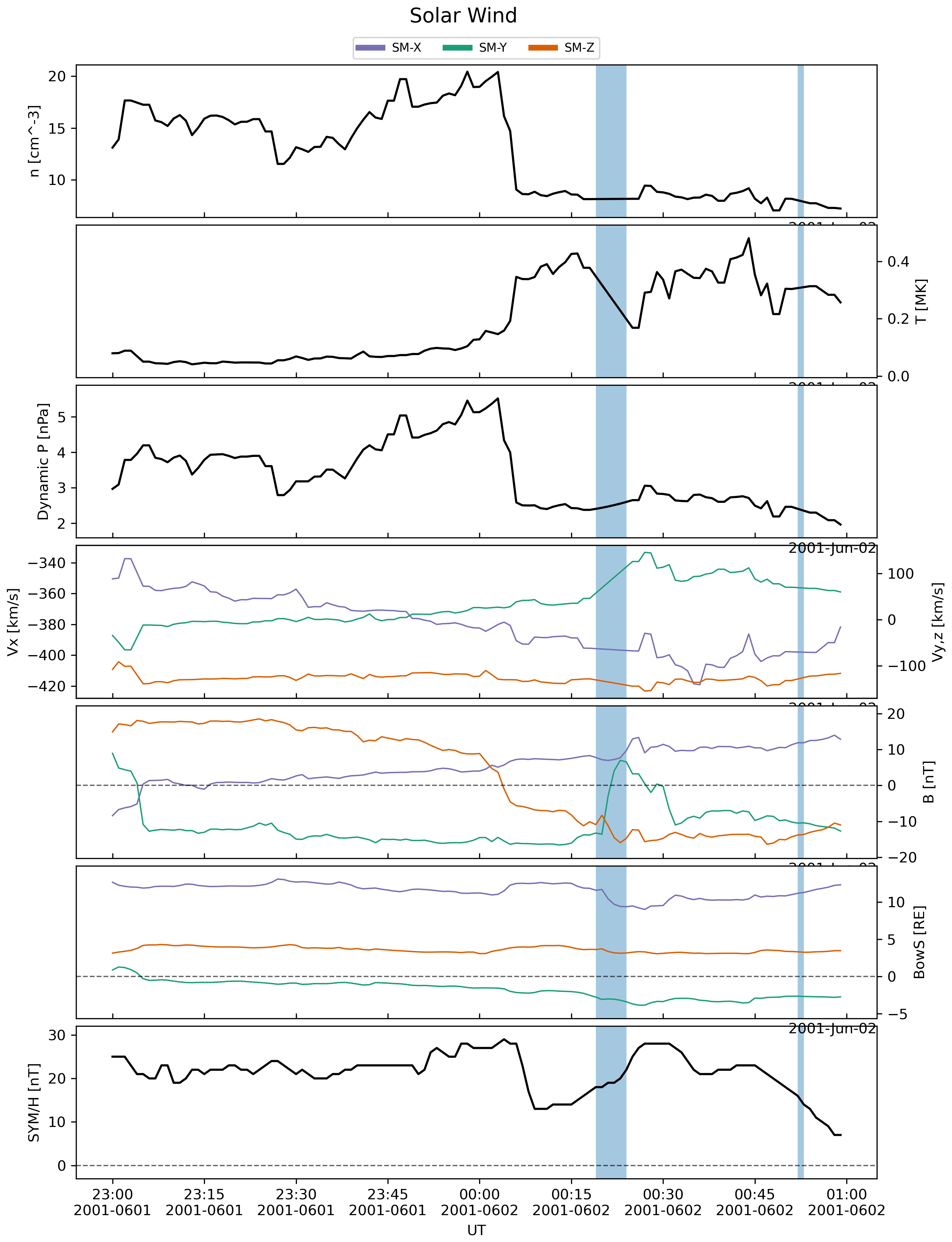
Saving "OMNI_HRO_1MIN.txt.png"
Writing Gamera solar wind to bcwind.h5
Making new raijuconfig.h5, destroying pre-existing file if there
Stamping file with git hash and branch, and script args
Adding waveModel to raijuconfig.h5
Reading /glade/derecho/scratch/ewinter/cgs/aplkaiju/kaipy-private/dev_312/kaipy-private/kaipy/raiju/waveModel/chorus_polynomial.txt
Adding Species to raijuconfig.h5
Adding params used to generate lambda distribution as root attribute

Template creation complete!


The PBS scripts ['./geospace-00.pbs'] have been created, each with a corresponding XML file. To submit the jobs with the proper dependency (to ensure each segment runs in order), please run the script geospace_pbs.sh like this:
bash geospace_pbs.sh
You should now see the following files in your run directory:
ls
bcwind.h5        geospace.json    OMNI_HRO_1MIN.txt_bxFit.png
geospace-00.pbs  geospace_pbs.sh  OMNI_HRO_1MIN.txt.png
geospace-00.xml  lfmQ.h5          raijuconfig.h5
The image files are summaries of the CDAWeb data used in the initial condition
file (bcwind.h5). Those plots should look similar to this:
Finally, submit the model run using the script generated by makeitso.py.
You will see the resulting PBS job ID (your job ID will differ from what is
shown below).
bash geospace_pbs.sh
7808651.desched1
Once the job is started in the queue, it should take about 80 minutes to run
(on derecho). When complete, you will see many new HDF5 files in your
run directory, along with PBS housekeeping files and logs. The most important
files are (repeated upper-case letters in the names represent integer
strings):
geospace_LLLLL_MMMMM_NNNNN_IIIII_JJJJJ_KKKKK.gam.h5These files contain the core MHD variables from the simulation, computed by the GAMERA portion of the MAGE model. The strings
LLLLL,MMMMM, andNNNNNcontain the number of subsections of theX,Y, andZdimensions used to divide the domain among MPI ranks. The stringsIIIII,JJJJJ, andKKKKKrepresent the MPI rank index along each dimension.geospace.mix.h5geospace.raiju.h5This file contains the results from the RAIJU portion of the MAGE model.
geospace.volt.h5This file contains the results from the VOLTRON portion of the MAGE model.
*Cpl*.h5Data used in coupling the different members of the model suite.
*.Res.RRRRR.h5These are checkpoint files generated during the simulation which can be used as restart points for future simulations.
Visualizing the results
Now perform a quick visualization of the results from your model using the
msphpic.py script, provided in the kaipy package.
msphpic.py -id geospace
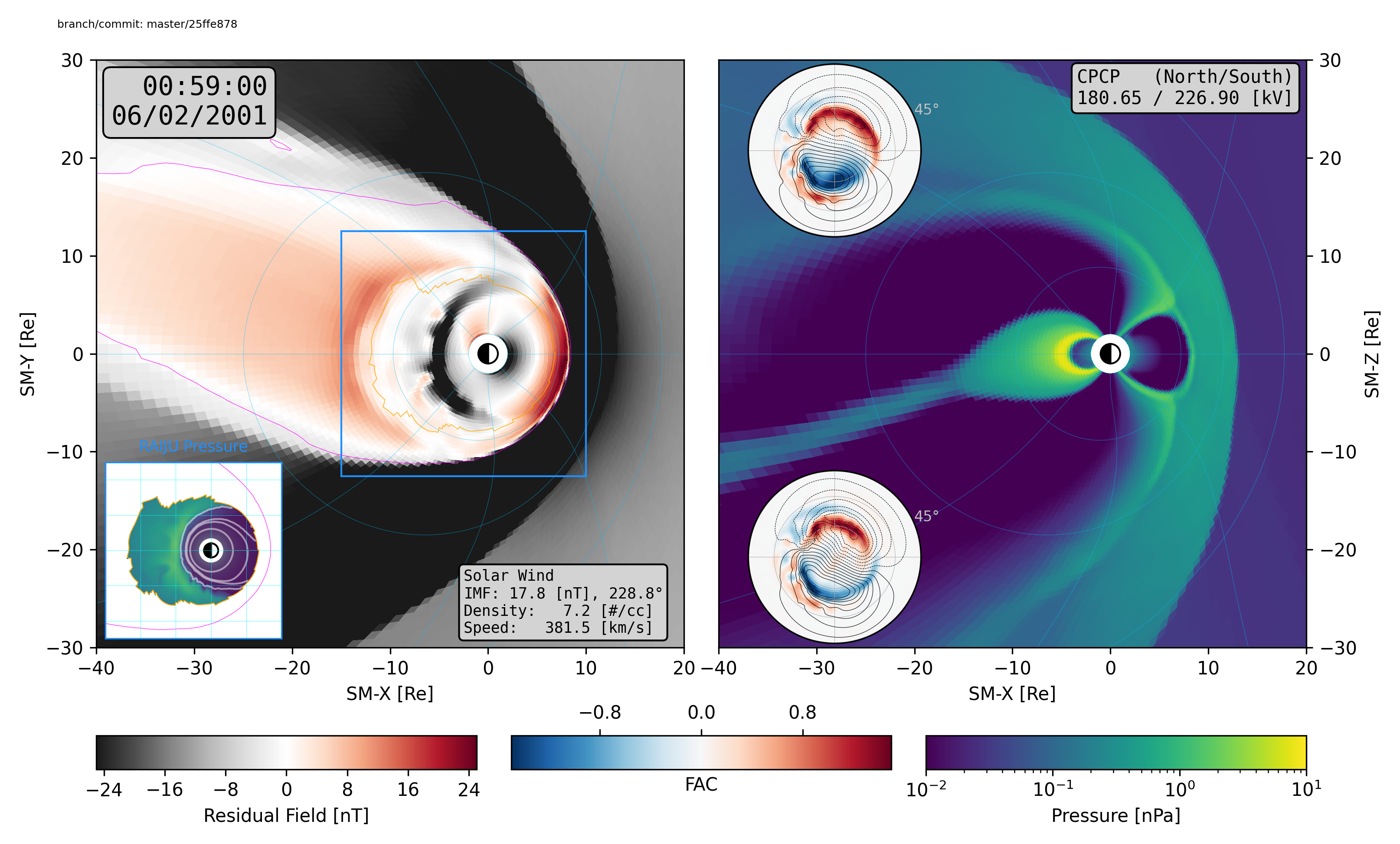
This script will create a file called qkmsphpic.png, which should look
similar to this: